The problem: your client work lives in a dozen inboxes
Most bookkeeping firms run client communication through email, plus a file-sharing link, plus a separate e-signature tool, plus a payment link on the invoice. Each one works on its own. Together they leave your team asking the same questions every month: did the client send the bank statements, or did they reply to the wrong thread? Did they approve that bill, or just say "looks fine" in a message nobody filed? Which version of the engagement letter did they sign?
The cost is not only time. When requests are scattered, nobody on your team can see at a glance which clients are holding up a close, and clients feel nagged because reminders arrive from several places with no context.
What your clients do in the Cordevra portal
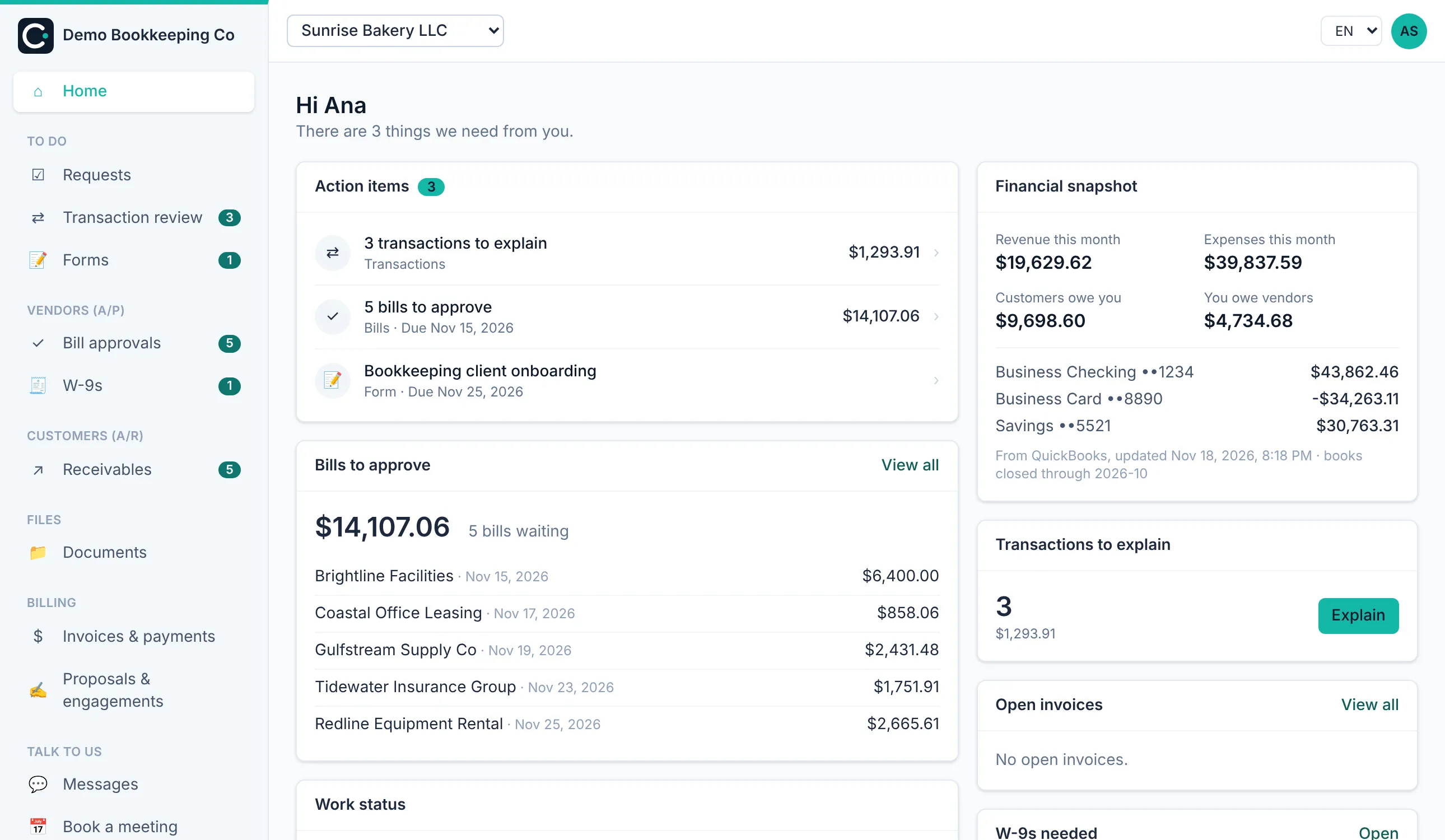
The portal is built around the things a bookkeeping client actually has to do for you. When a client signs in, they see a short list of what you need from them, with the amount and due date where it matters.
- Upload documents against a specific request, such as monthly bank statements or payroll reports, instead of attaching them to whatever email is on top.
- Answer transaction questions your team sends from QuickBooks review. Answers go back to QuickBooks Online after your team approves them.
- Approve, hold or reject bills grouped by pay run, following the approval rules you set for that client.
- Fill in forms and sign engagement letters and other documents with built-in e-signatures.
- See what they owe you and pay online by card or ACH, with the invoice tied to the work you delivered.
- Check a snapshot of their numbers pulled from QuickBooks Online, so the portal is somewhere clients want to visit, not only somewhere they get chased.
What your firm sees on the other side
Every request a client has not finished lands on a Waiting on client board in Cordevra, grouped by how long the client has had it: document requests, transaction questions, W-9 requests, e-signatures and forms. From there you can send a reminder in one click instead of writing a fresh email. Messages and reminders are logged on the client's activity, so anyone on the team can pick up where a colleague left off.
Uploaded files go into organized folders for each client, showing what your firm shared and what the client uploaded. Requests created by your recurring workflows appear in the portal automatically each period, so the October close asks for October statements without anyone setting it up again.
Built to make your firm look its best
The portal is part of your client experience, so it should feel like your firm, not like a stack of tools. On Practice Plus you can run a white-label portal on your own domain. On every plan, clients never pay for a seat and you never pay per portal user.
Security basics
Client portals hold bank statements, payroll reports and tax forms, so security is built in from the start: two-step sign-in, encryption of sensitive fields, separate data for every firm and a full audit log. If you are deciding how to move clients off email attachments, our guide to client portal vs email for sensitive documents covers the basics.